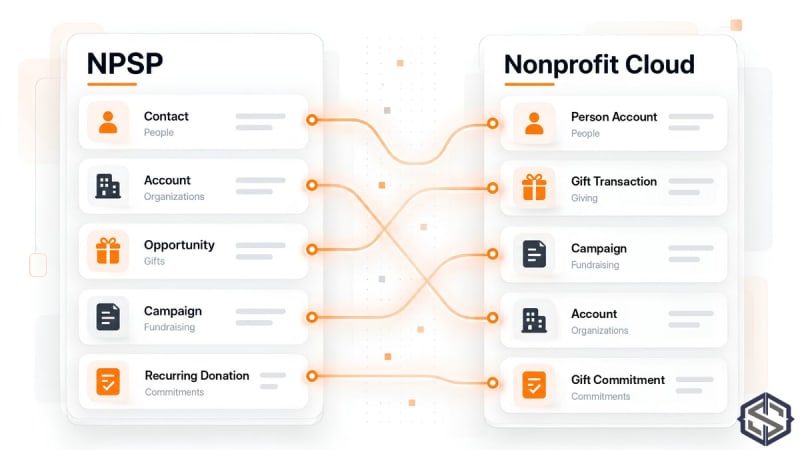
Short answer: most NPSP records have a Nonprofit Cloud home, but not the same shape. Contacts become Person Accounts, Household Accounts become Party Relationship Groups, Opportunities become Gift Transactions, Recurring Donations become Gift Commitments with Gift Commitment Schedules, and GAU Allocations become Gift Transaction Designations. Load in dependency order, people and households first and gifts last, and keep a crosswalk of every old and new record ID so you can reconcile totals and answer questions after go-live.
Why mapping is the riskiest part of the migration
Nonprofit Cloud is not NPSP with new labels. The objects are designed differently, so one NPSP record can become two Nonprofit Cloud records, and some NPSP fields have no direct equivalent. Most migration problems trace back to a mapping decision made quickly in week two and discovered in week twelve. Spend the time here.
The core mapping table
| NPSP | Nonprofit Cloud | Notes |
|---|---|---|
| Contact (individual) | Person Account | Each individual becomes an account and a contact in one record |
| Household Account | Party Relationship Group | Groups people into a household |
| Organisation Account | Business Account | Largely unchanged |
| Affiliations | Account Contact Relationships | Managed through the Actionable Relationship Center (ARC) |
| Relationships | Relationship records in ARC | Re-create reciprocal relationships deliberately |
| Opportunity (one-off donation) | Gift Transaction | The gift itself |
| Opportunity with Payments (pledge) | Gift Commitment plus Gift Transactions | Each payment becomes its own transaction |
| Recurring Donation | Gift Commitment and Gift Commitment Schedule | The schedule creates expected transactions |
| General Accounting Unit | Gift Designation | Your funds |
| GAU Allocation | Gift Transaction Designation | Splits a gift across funds |
| Partial and account soft credits | Gift Soft Credit | Credit to someone other than the donor |
| Tribute and honoree fields | Gift Tribute | In honour or memory gifts |
| Campaign | Campaign | Outreach Source Codes are available for appeal tracking |
| PMM Program | Program | Programme Management Module package to native |
| PMM Service | Benefit | What participants receive |
| PMM Program Engagement | Program Enrollment | A participant in a programme |
| PMM Service Schedule and Session | Benefit Schedule and Benefit Session | Planned delivery |
| PMM Service Delivery | Benefit Disbursement | What was actually delivered |
Object names are taken from Salesforce's Nonprofit Cloud documentation and Trailhead. Your org may also have custom objects, which need their own mapping decisions.
The three decisions that need the most thought
1. Households
In NPSP, a household is an Account that Contacts belong to, and many reports, greetings and rollups hang off it. In Nonprofit Cloud, people are Person Accounts and the household is a Party Relationship Group that links them. Decide early how you will name households, which person is primary, and how household-level giving totals will be reported. Test this on twenty real households before you load thousands.
Person Accounts also change how access works, because one record now carries both account and contact permissions. Our post on Person Accounts and access explains what to check.
2. Pledges and recurring gifts
An NPSP pledge is usually an Opportunity with several Payments. In Nonprofit Cloud the promise and the payments are separate: a Gift Commitment holds the promise, and each payment is a Gift Transaction. Recurring Donations follow the same pattern, with a Gift Commitment Schedule generating expected transactions that start as Unpaid. Decide how far back to recreate schedules, and how to treat lapsed or closed recurring donations.
3. Fund designations
GAU Allocations become Gift Transaction Designations against Gift Designations. Check every gift's allocations add up to the gift amount before migrating. Nonprofit Cloud applies a default designation when none is set, so unallocated history can quietly land in your general fund.
A load order that holds up
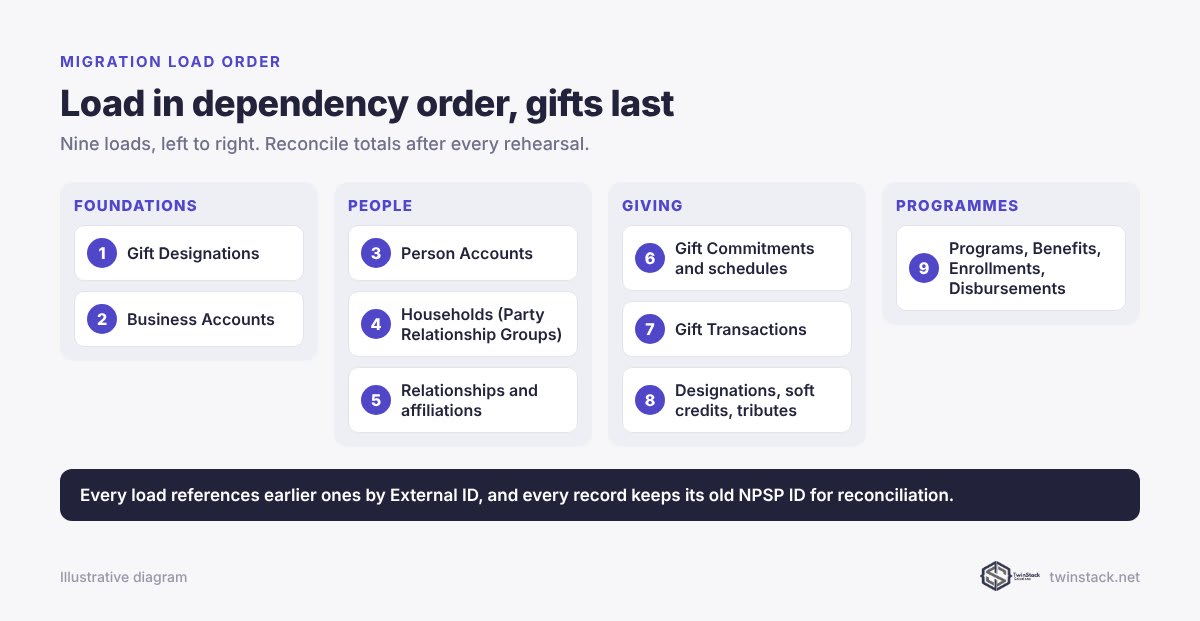
- Gift Designations (your funds), with an External ID holding the old GAU ID.
- Business Accounts (organisations), with the old Account ID.
- Person Accounts, with the old Contact ID.
- Party Relationship Groups and memberships for households.
- Relationships and affiliations.
- Gift Commitments and schedules, for pledges and recurring gifts.
- Gift Transactions, linked to donors and, where relevant, to commitments.
- Gift Transaction Designations, Soft Credits and Tributes.
- Programmes, Benefits, Enrollments and Disbursements, if you are moving PMM data.
Every load references the previous ones by External ID rather than by Salesforce record ID. That way you never have to export, VLOOKUP and re-import IDs between passes. Our free Smart Lookup Data Loader resolves lookups by name or code during the import, and our guide to upserts and match keys explains the approach.
Keep a crosswalk and reconcile every rehearsal
Store the old NPSP record ID on every migrated record. After each rehearsal, compare:
- the count of records by type, old against new
- total gift value overall and by year, to the penny
- total value by designation
- the number of households and people in them
If a total is off, the crosswalk shows exactly which records differ. Plan for several rehearsals before cut-over, each in a fresh sandbox.
Frequently asked questions
How do NPSP households map to Nonprofit Cloud?
Individuals become Person Accounts, and the NPSP Household Account becomes a Party Relationship Group that links household members. Naming, primary member and household-level reporting need to be redesigned rather than copied.
What happens to Opportunities when moving to Nonprofit Cloud?
Donation Opportunities become Gift Transactions. Pledges with several Payments become a Gift Commitment plus one Gift Transaction per payment.
How do Recurring Donations map to Nonprofit Cloud?
Recurring Donations become Gift Commitments with a Gift Commitment Schedule, which creates expected Gift Transactions with an Unpaid status until payment arrives.
What replaces GAU Allocations in Nonprofit Cloud?
General Accounting Units become Gift Designations, and allocations become Gift Transaction Designations that split a gift across funds.
What order should data be loaded into Nonprofit Cloud?
Designations and organisations first, then Person Accounts, households and relationships, then commitments, then gift transactions, then designations, soft credits and tributes, and finally programme data.
How do you check a migration is complete?
Keep the old record ID on every new record and reconcile record counts, total gift value by year and total value by designation after every rehearsal.
Mapping a complex org? Book a free call and bring your object list.