
There are two kinds of failed import. One tells you which row broke and why. The other tells you that 1,204 records failed and leaves an error file for you to reconcile against the original by hand.
The difference is most of the time you will spend.
Errors you will actually see
INVALID_OR_NULL_FOR_RESTRICTED_PICKLIST. Your file has a value the picklist does not allow. Usually a country written as “USA” against a picklist expecting “United States”, or a status from the old system that was never migrated.
REQUIRED_FIELD_MISSING. A field is required either on the object or by a validation rule. Note that page layout requirements do not apply to imports, so this is coming from the field definition or from a rule.
FIELD_CUSTOM_VALIDATION_EXCEPTION. A validation rule rejected the row, and the message is whatever your org’s admin wrote in that rule. Often the most informative error you will get, because somebody wrote it in plain English.
MALFORMED_ID. A lookup got something that is not a valid ID. Usually a truncated value, a name that was supposed to be converted to an ID and never was, or a fifteen-character ID where an eighteen-character one was expected.
DUPLICATES_DETECTED. A duplicate rule blocked the insert. Worth reading carefully, because sometimes the rule is right and your match key is wrong.
UNABLE_TO_LOCK_ROW. Contention. Two processes tried to update related records at once. Often just a matter of reducing batch size or not running an import while another job is active.
STRING_TOO_LONG. A value exceeds the field length. Common with description fields pulled out of a legacy system that had no limit.
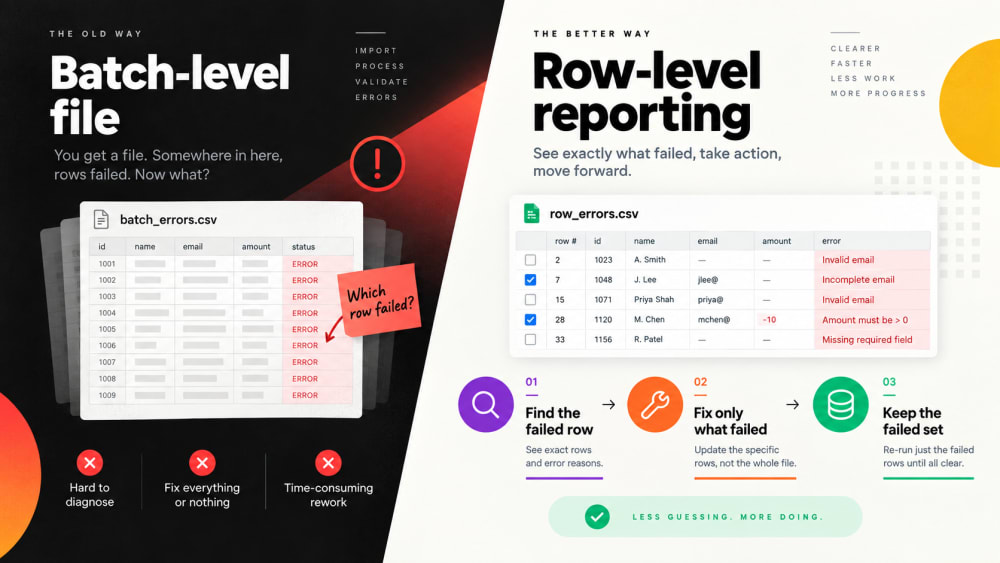
The reconciliation problem
Most of these are quick fixes on their own. What makes them expensive is finding them.
A batch-level error file gives you failed rows in a separate document with an error column appended. To fix anything, you have to match those rows back to your source, work out what changed, correct the original, then decide whether to re-run everything or just the failures. If the file has been edited since, that reconciliation gets genuinely difficult.
Row-level reporting removes that step. The error points at line 219 and names the field. You open your file at line 219 and fix it.
A working order for diagnosis
- Sort errors by type, not by row. Twelve hundred failures are usually three problems repeated, not twelve hundred problems.
- Fix the most common one first and count how many rows it accounts for. Often it is 90% of them.
- Check whether it is your data or the org. A restricted picklist rejecting a legitimate value may mean the picklist needs the value added, not that your file is wrong.
- Re-run only the failures. If your match rule is sound, re-running the whole file is safe because successful rows just update to the same values, but it wastes time and clutters the audit trail.
- Keep the failed set. It is the best documentation you have of where your source data and your org disagree.
Prevention beats diagnosis
Most failures are visible before a load if you look. Validate a sample first. Check picklist values against the field definition rather than against what you think they are. Confirm required fields and active validation rules on the target object. Check field lengths against the longest value in each column.
Smart Lookup Data Loader reports every row as inserted, upserted or failed, names the field that caused each failure, and lets you confirm the mapping and match rule before anything is committed. The goal is not fewer errors. It is errors you can act on in a minute rather than an afternoon.

Import by name, email or code. Skip the VLOOKUP.
Smart Lookup Data Loader is a free, 100% native Salesforce app by TwinStack. Lookups resolve as records land, upserts match on several fields, and every failed row tells you why.
Get It Now, Free