Short answer: check the eligibility criteria, gather your tax ID and proof of nonprofit status, log in to the Power of Us portal at powerofus.salesforce.com and submit the application. Salesforce says to allow up to three days for review. Once approved, log back in to the portal and select your product. Approved nonprofits receive 10 free licences of Agentforce Nonprofit, formerly Nonprofit Cloud, and discounted pricing on more licences and other Salesforce products.
What Power of Us gives you
Power of Us is Salesforce's programme for nonprofit and education organisations. For eligible nonprofits it means:
- 10 free licences of Agentforce Nonprofit, Salesforce's nonprofit CRM, formerly called Nonprofit Cloud.
- Discounted pricing on additional licences and many other products. Nonprofit Cloud Core lists at $70 per user per month for nonprofits.
- Nonprofit discounts on Slack and Tableau, through Slack for Nonprofits and a Tableau offering via TechSoup.
Since December 2025, new applicants receive Agentforce Nonprofit licences rather than NPSP licences. The licences are free, but implementation is not. Our nonprofit pricing guide shows what the rest of a first-year budget looks like.
Who is eligible
Salesforce publishes its eligibility criteria as a separate document linked from the Power of Us page, with versions for different countries. In general, you need to be a legally registered nonprofit with tax-exempt or charitable status in your country, and you must comply with Salesforce's Acceptable Use Policy. Read the criteria before applying, because some organisation types are treated differently.
What you need before you start
- Your tax ID number.
- Proof of nonprofit status. In the United States, your IRS 501(c)(3) or 501(c)(4) determination letter. Outside the US, the equivalent tax or charity registration document for your country.
- A state or local tax exemption certificate, if one applies to you.
- Contact details for the person who will own the Salesforce account, ideally a role-based email that will outlast any one staff member.
The application, step by step
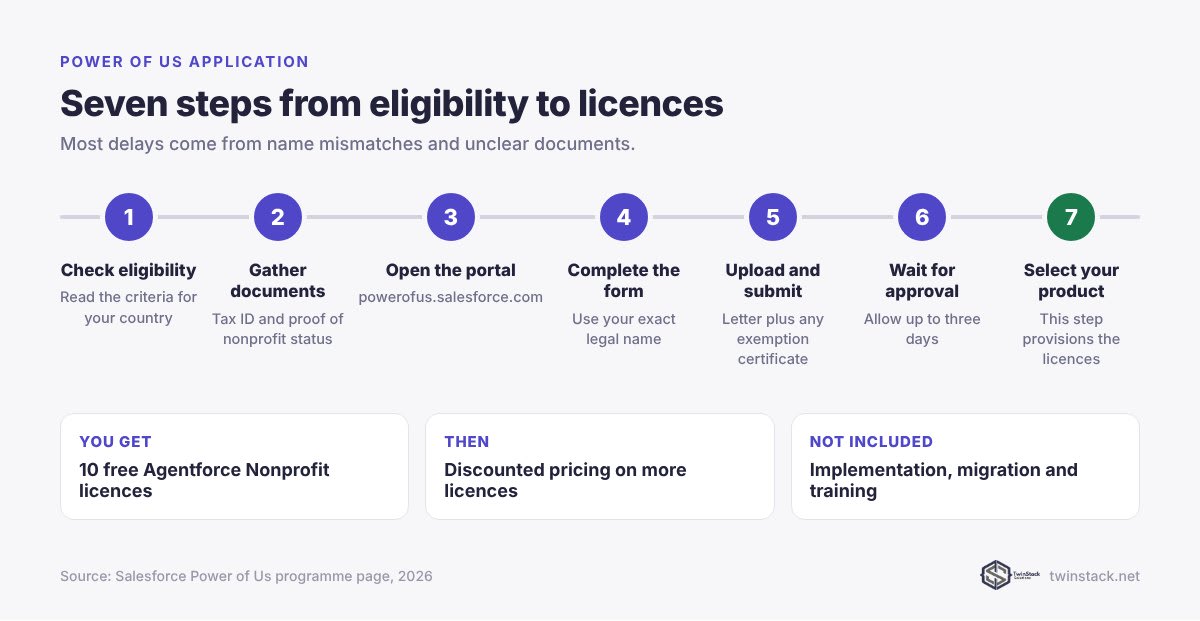
- Read the eligibility criteria for your country and confirm you qualify.
- Go to the Power of Us portal at powerofus.salesforce.com and log in or create an account.
- Complete the application with your organisation's legal name, tax ID and address, exactly as they appear on your registration documents.
- Upload your documents: the determination letter or national equivalent, plus any exemption certificate.
- Submit and wait. Salesforce says to allow up to three days for review and processing.
- Watch for the approval email. If Salesforce asks for more information, reply quickly with the requested document.
- Log back in to the portal and select your product. This is the step that actually provisions your licences.
After approval: what to do first
- Do not start building in production straight away. Decide what you need Salesforce to do in phase one, usually donors and volunteers, and keep the first phase small.
- Set up security basics: multi-factor authentication, a named admin, and a plan for who sees what. Our free Who Sees What helps you check access as you add users.
- Plan your data move. Most charities arrive with spreadsheets. Our guides to nonprofit data imports and donor data clean-up cover the approach.
- Budget for help where you need it. Run the cost estimator, choose nonprofit, and it applies the 10 free licences automatically.
Common reasons applications are delayed
- Name mismatches. The organisation name on the form differs from the one on your registration document.
- Unclear documents. Scans that are cropped, unreadable or out of date.
- The wrong document type for your country.
- Missing exemption certificates where one is required.
Already on NPSP?
If your organisation already runs NPSP on donated licences, you do not need to reapply to keep working. Confirm your renewal terms with your Salesforce account executive, and read NPSP vs Nonprofit Cloud before deciding whether to move.
Frequently asked questions
How do I apply for Salesforce Power of Us?
Review the eligibility criteria, log in to the Power of Us portal at powerofus.salesforce.com, submit your application with your tax ID and proof of nonprofit status, and once approved, log back in to select your product.
How long does Power of Us approval take?
Salesforce says to allow up to three days for an application to be reviewed and processed after submission.
What documents do I need for Power of Us?
Your tax ID number and legal proof of nonprofit status, such as an IRS 501(c)(3) or 501(c)(4) determination letter in the US or the equivalent document in your country, plus a state or local tax exemption certificate if applicable.
How many free Salesforce licences do nonprofits get?
Eligible nonprofits receive 10 free licences of Agentforce Nonprofit, formerly Nonprofit Cloud, through Power of Us, plus discounted pricing on additional licences.
Do new nonprofits still get free NPSP licences?
No. Since December 2025, new Power of Us applicants receive Agentforce Nonprofit licences rather than NPSP licences.
Is implementation included with Power of Us?
No. Power of Us donates and discounts licences. Setting up Salesforce, migrating data and training staff are separate costs.
Prices in this article are Salesforce list prices in US dollars, per user per month billed annually unless stated, as verified on 29 September 2026. Salesforce changes pricing, so confirm with Salesforce before you sign.
Applying soon? TwinStack helps clients through the Power of Us application at no charge. Book a free call.