
Search for a free Salesforce data loader and you will find several. They are not free in the same way, and the difference usually only appears once you depend on the tool.
The four kinds of free
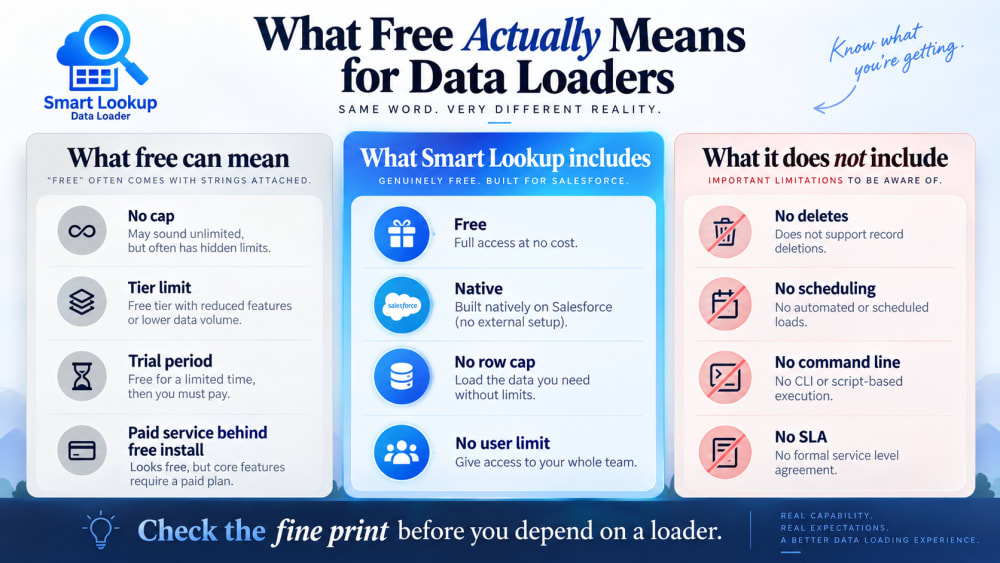
Genuinely free. No cost, no cap, one version. The reason it exists is usually that the company makes its money elsewhere, often consulting, and the tool is how people find them. Salesforce’s own Data Import Wizard and Data Loader are free for a different reason: they are part of the platform.
Free tier. Free up to a threshold. Ten thousand records a month, or three users, or one connection. The tool works exactly as advertised until the month you have a real migration, which is exactly when you need it.
Free trial. Full functionality for fourteen or thirty days, then a paid plan. Perfectly legitimate, but it is a trial, and the word “free” in the listing is doing a lot of work.
Free to install. No charge for the package, but it calls a paid service to do the actual work. The AppExchange listing is free, the thing it depends on is not.
How to check before you commit
Look for a pricing page. A genuinely free tool usually does not have one. A tool with tiers always does.
Search the listing for “per”, “up to”, “limit” and “plan”. These words appear next to the constraint.
Check whether it makes external callouts. A package that sends data to an external service has a running cost somewhere, and that cost eventually reaches you. Native packages that process entirely inside your org do not have that problem, which is often why they can stay free.
Read the reviews for the word “upgrade”. Reviews mentioning hitting a limit tell you where the ceiling is more reliably than the listing does.
Check the last updated date. Free tools that have not been updated in two years are a different kind of risk.
Why free can be honest
Free is not automatically suspicious. A native AppExchange package that runs entirely inside your org has almost no marginal cost per install. There is no server processing your file, no bandwidth, no per-record infrastructure. The cost is building and maintaining it.
For a consultancy, that cost is justified because the tool demonstrates competence to exactly the people who hire consultancies. That is a sustainable arrangement, and it is different from a venture-funded free tier that exists to convert you later.
What free means for Smart Lookup Data Loader
No licence cost. No per-record or per-load charge. No row cap. No user limit. No tier, and no version with features held back.
It is a native managed package, so nothing runs on TwinStack infrastructure when you import a file. Your data is processed by your org, under your user, with your permissions. That is the reason the pricing can stay at zero without a catch attached.
What free does not include
It does not include a support contract with a response time. Questions are answered, but there is no SLA behind it.
It does not include custom development. If your org needs something the tool does not do, that is a consulting conversation, not a feature request that gets built for free.
It does not mean the tool does everything. It does not do scheduled loads, command-line automation or deletes. Those needs are better served by the standard Data Loader, also free, from Salesforce itself.
The comparison that matters
Over a year, a paid data loader at a typical subscription costs more than most teams expect, and the value it adds over a good free native tool is often scheduling and ETL features they never switch on.
The honest test: list the three things you actually need a loader to do. If a free native package does all three, the subscription is buying you optionality you may never use.

Import by name, email or code. Skip the VLOOKUP.
Smart Lookup Data Loader is a free, 100% native Salesforce app by TwinStack. Lookups resolve as records land, upserts match on several fields, and every failed row tells you why.
Get It Now, Free