
Ask an admin to describe their last big import and the story almost never starts with the import. It starts with a spreadsheet.
Why the VLOOKUP exists
A lookup field in Salesforce stores a record ID. Not a name, not an email, an eighteen-character identifier that nothing outside Salesforce has ever seen.
Your source file, meanwhile, came from somewhere else. A billing system, a conference registration list, a spreadsheet someone in finance maintains. It identifies an account by its name, or by a customer code, or by the email address of the person who owns it. Those are the identifiers the business actually uses.
So the standard loader gets handed a file it cannot use, and the gap gets closed by hand:
- Export every parent record and its ID.
- Paste that export into a second tab.
- VLOOKUP the ID against whatever identifier your file has.
- Check how many rows returned
#N/A. - Chase those down, usually because of a trailing space, a trading name, or a record that was merged last month.
- Repeat for the next lookup field.
On a file with three lookup fields, that is three rounds before a single record has been written.
What actually goes wrong
Staleness. The ID export is a snapshot. If anyone merges or creates records between your export and your import, your file is now wrong and nothing will tell you.
Silent partial matches. VLOOKUP returns the first match. If two accounts share a name, you get whichever one sorts first, and the record attaches to the wrong parent. That error is invisible until someone notices their pipeline is under the wrong account months later.
Formatting damage. Record IDs survive a round trip through a spreadsheet badly. Long numeric external codes get converted to scientific notation. Leading zeros disappear. IDs get truncated in a narrow column and pasted as values.
It does not scale down. The prep cost is roughly the same whether you are loading forty rows or four thousand, which is why small routine updates get postponed until they become big ones.
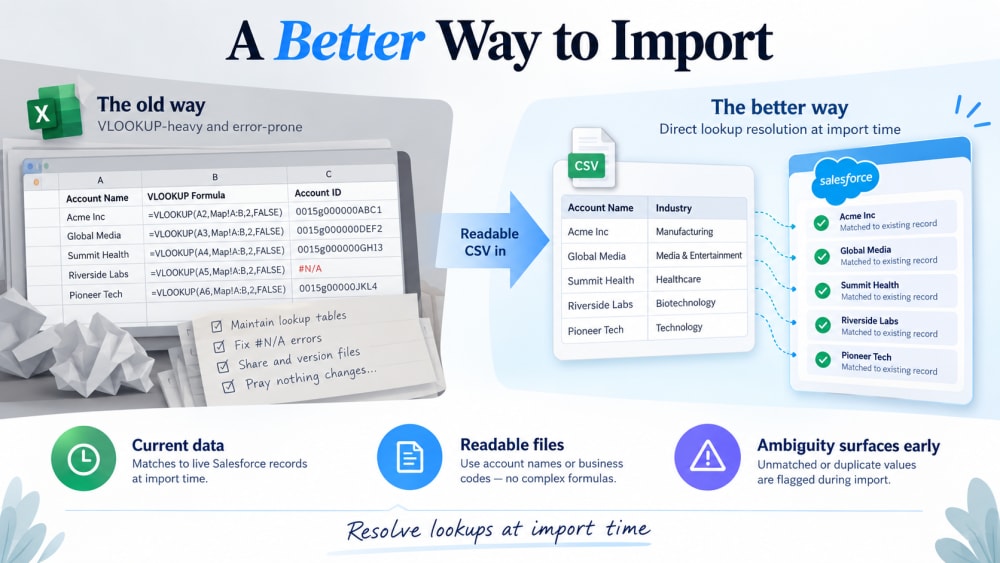
Removing the step
The alternative is to resolve the relationship at import time rather than in advance. You tell the loader that the account_name column corresponds to the Account lookup, and it matches against live data in the org as each row is processed.
Three things change:
The data is current. Matching happens against the org as it is at that moment, not against an export from an hour ago.
Your file stays readable. The column says acme-emea-014, not 001Ax000003kL2mQAE. When something fails, you can see what it was trying to do.
Ambiguity surfaces instead of resolving silently. A row that cannot be matched confidently is reported rather than quietly attached to the first candidate.
What still needs care
Removing the VLOOKUP does not remove the need to think about your match key. If your file references accounts by name and your org has three records called “Acme”, that ambiguity is real and no tool resolves it for you. It just becomes visible before the load rather than after.
The fix is the same one you would apply anywhere: match on a combination of fields, or use an external ID that was designed to be unique.
In practice
Smart Lookup Data Loader does this natively and for free. Point it at your CSV, tell it which columns are lookups, choose your match rule, and run it. The spreadsheet surgery step disappears, which on most loads is the majority of the work.

Import by name, email or code. Skip the VLOOKUP.
Smart Lookup Data Loader is a free, 100% native Salesforce app by TwinStack. Lookups resolve as records land, upserts match on several fields, and every failed row tells you why.
Get It Now, Free