Every time somebody asks in the Trailblazer Community how to get a web form into Salesforce, at least one answer says "just use Web-to-Lead." It is good advice for about a third of the people asking, and unhelpful for the rest.
Here is how to tell which group you are in.
What is Salesforce Web-to-Lead?
Web-to-Lead is a feature Salesforce has shipped for years. You generate an HTML form snippet in Setup, paste it into a web page, and submissions post directly into your org as Lead records. No integration, no cost, no middleware.
For a marketing team capturing inbound enquiries on a website they control, it is genuinely hard to beat.
Where does Web-to-Lead run out?
It only creates Leads. That is not a limitation you can work around. If you are collecting volunteer signups, job applications, event RSVPs, support intake, internal IT requests, or post-program surveys, none of those are Leads. Forcing them into the Lead object pollutes your sales pipeline and confuses your reporting.
There is a daily submission limit. Salesforce caps Web-to-Lead submissions per day, with excess going to a pending queue. Most orgs never touch it, but a viral campaign or a bot attack will. Check the current limit in Salesforce documentation, as it has changed over time.
Form building is on you. You get raw HTML. Conditional logic, multi-page forms, progress bars, required-field validation, mobile styling, file uploads: none of it is included. You are either writing that yourself or paying for a form product.
No file uploads. Web-to-Lead does not accept them.
It needs a web page you control. If you want to send a form link in an email, post it in Slack, or hand out a QR code at an event, you need somewhere to host the HTML. Google Forms gives you a shareable link for free.
Spam is your problem. Web-to-Lead is a public POST endpoint. Without your own CAPTCHA and validation, you will collect junk.
Where does Google Forms win?
Anyone can build one. This is the real reason Google Forms is everywhere inside organizations that own a CRM. A program manager or event coordinator can build and publish a form in four minutes without involving an admin or a developer.
Logic, sections, and validation are built in. Skip logic, required questions, response validation, and multi-section forms come free.
File uploads work. Useful for applications, expense submissions, and photo evidence from the field.
It is a link, not a page. Share it anywhere. Email, Slack, WhatsApp, a printed QR code.
Free, unlimited, and already in your Google Workspace. No new vendor, no procurement.
Anonymous or authenticated, your choice. Google Forms can require a Workspace sign-in, which Web-to-Lead cannot do at all.
How do Google Forms and Web-to-Lead compare side by side?
| Google Forms + Auto Sync | Web-to-Lead | |
|---|---|---|
| Cost | Free | Free |
| Objects it can feed | Any, via Flow | Lead only |
| Form builder | Full featured, built in a browser | Raw HTML, build it yourself |
| Conditional logic | Yes | No |
| File uploads | Yes | No |
| Needs a hosted web page | No, shareable link | Yes |
| Submission limits | None imposed by the app | Daily cap applies |
| Spam protection | Google's, plus optional sign-in | You build it |
| Who can create a form | Anyone | Admin or developer |
| Raw submission preserved | Yes, on Form_Response__c | No, mapped straight to Lead |
| Setup effort | One-time per form | One-time per form |
What is the catch with Google Forms, and how do you fix it?
The obvious problem: Google Form responses do not go into Salesforce by themselves. They go into a Google Sheet, where they sit.
That is the gap Google Form Auto Sync fills. It is a free native AppExchange package that captures every submission as a Salesforce record the moment it is submitted, with no middleware in between. The form posts directly to a REST endpoint in your own org.
Combined, you get Google Forms' form-building strengths with Web-to-Lead's directness, and without Web-to-Lead's Lead-only constraint.
How does routing differ between the two?
Web-to-Lead maps form fields to Lead fields at capture time. If the mapping is wrong or the form changes, you get bad Leads and no record of what the person actually submitted.
Google Form Auto Sync captures the whole submission on Form_Response__c first, then you route it with a record-triggered Flow. Two practical consequences:
- The original is preserved. If your Flow has a bug, the raw data is still there and you can reprocess it. With Web-to-Lead, a bad mapping means the data is gone.
- You choose the destination. Lead, Contact, Case, Campaign Member, Program Engagement, a custom object. Different forms can route to different objects.
So which should you use?
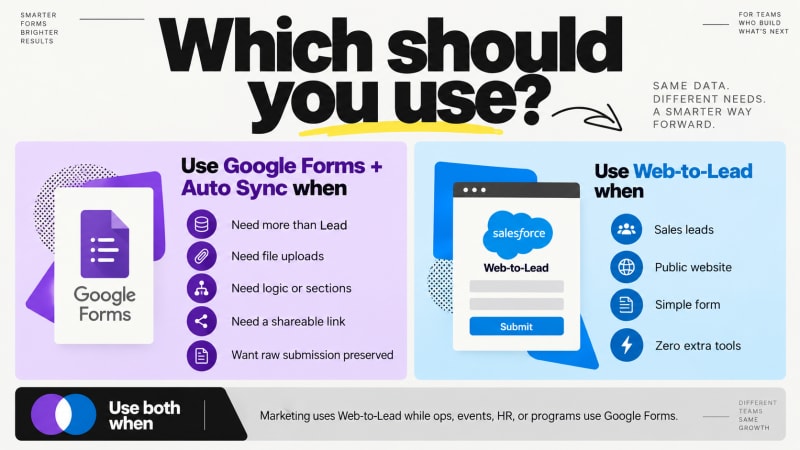
Use Web-to-Lead when: you are capturing sales leads, on a public web page you control, with a simple field set, and you want zero moving parts.
Use Google Forms plus Auto Sync when: you need anything other than a Lead, you need conditional logic or file uploads, you do not have a web page to host a form, non-technical staff need to create forms themselves, or you want the raw submission preserved for audit.
Use both when: your marketing site runs Web-to-Lead for enquiries while your operations, HR, events and program teams run Google Forms for everything else. This is what most organizations actually end up doing, and there is nothing wrong with it.
Capture every submission, free.
Google Form Auto Sync posts each Google Form response straight into your own Salesforce org. No middleware, no task counter, no tiers.
Get It Now, FreeSalesforce platform limits change. Verify current Web-to-Lead limits in Salesforce Help before designing around them.