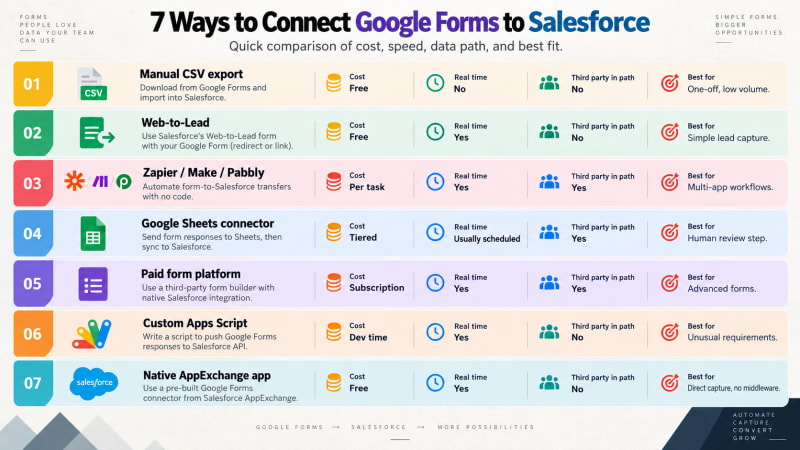
There are seven realistic ways to get Google Form responses into Salesforce. This is a comparison of all of them, including the ones we do not sell.
We build one of these. We have tried to be straight about where the others win, because a comparison that concludes "our thing is best at everything" is not useful to anybody.
How do the methods compare at a glance?
| Method | Cost | Real time | Third party in path | Best for |
|---|---|---|---|---|
| Manual CSV export | Free | No | No | One-off, low volume |
| Web-to-Lead | Free | Yes | No | Simple lead capture on your own site |
| Zapier / Make / Pabbly | Per task | Yes | Yes | Multi-app workflows |
| Sheets connector | Tiered | Usually scheduled | Yes | When you want a review step |
| Paid form platform | Subscription | Yes | Yes | When you need advanced forms |
| Custom Apps Script | Dev time | Yes | No | Unusual requirements, in-house devs |
| Native AppExchange app | Free | Yes | No | Direct capture, no middleware |
1. Manual export and import
Download the responses as CSV, run Data Loader.
Strengths: zero setup, zero cost, complete control over what goes in.
Weaknesses: it is a recurring human task, which means it will eventually not happen. Two hours a week is roughly a hundred hours a year.
Verdict: fine for a form that runs once. Not a process.
2. Salesforce Web-to-Lead
Replace the Google Form with Salesforce's built-in HTML form.
Strengths: free, built in, direct, no integration to maintain.
Weaknesses: creates Leads and only Leads. No conditional logic, no file uploads, no form builder, requires a hosted page, daily submission cap, and you build your own spam protection.
Verdict: the right answer for straightforward marketing lead capture on a site you control. Wrong for everything else. Full comparison in our Google Forms vs Web-to-Lead post.
3. General automation platforms
Zapier, Make, Pabbly Connect and similar. Google Forms as trigger, Salesforce as action.
Strengths: genuinely excellent products. Fast setup, huge app libraries, good error visibility, and they let you chain steps: form → Salesforce → Slack → email. If your workflow spans several tools, nothing else does this as well.
Weaknesses: per-task pricing that scales with your success. A third party in your data path holding credentials to your org. Another vendor, login and renewal. Silent failure when a plan limit is reached.
Verdict: the right answer when the workflow genuinely spans multiple applications. Overkill and expensive when all you need is form to CRM.
4. Google Sheets connectors
Tools like G-Connector and Coefficient that sync a Google Sheet to Salesforce, with the form writing to the sheet.
Strengths: the spreadsheet is a real staging layer. You can clean, dedupe, enrich and eyeball data before it enters Salesforce, and you can bulk-import historical responses.
Weaknesses: usually scheduled rather than instant. Adds a fragile middle layer that people edit, sort, and filter. Column drift when the form changes. We covered these failure modes in detail separately.
Verdict: good when you want a deliberate human review step. Bad when you want speed, because you are paying for a staging layer you do not need.
5. Paid form platforms with native connectors
Jotform, FormAssembly, Formstack, Titan and similar. Replace Google Forms entirely with a product that has a Salesforce integration built in.
Strengths: genuinely powerful. Direct field mapping to Salesforce objects, prefill from Salesforce data, e-signature, payments, conditional logic, HIPAA options. For complex data collection this category is the right answer.
Weaknesses: a subscription, often a substantial one. And you have to move off Google Forms, which means retraining everyone who currently builds forms in four minutes without asking permission.
Verdict: if you need prefill from Salesforce, payments, or signatures, buy one of these. If you just need to capture what people typed, you are paying a lot for capabilities you will not use.
6. Custom Apps Script
Write your own Google Apps Script that posts to a Salesforce REST endpoint.
Strengths: free, direct, no third party, complete control.
Weaknesses: somebody has to build it, secure it properly, handle OAuth token refresh, add error handling and retries, and maintain it forever. Most custom integrations we are asked to rescue were built by somebody who has since left.
Verdict: reasonable if you have real requirements no product meets and a team to maintain it. Usually it is a slower, less robust version of option 7.
7. Native AppExchange app
A managed package that installs into your org and does this one job.
This is Google Form Auto Sync. A short Apps Script inside your form authenticates via OAuth 2.0 Client Credentials against an External Client App and posts each submission to a REST endpoint in your own org. Salesforce creates a Form_Response__c record with field-level security enforced.
Strengths: free with no tiers or caps. No third party in the data path. Real time. Passed Salesforce Security Review. Installs and upgrades through the standard AppExchange path. Setup wizard built for admins, not developers.
Weaknesses: it does one thing. No direct field mapping to Lead or Contact, so routing is a Flow you build. One-time script paste per form. No connections to other applications.
Verdict: the right answer when the requirement is exactly "get Google Form responses into Salesforce, reliably, without adding cost or a vendor."
How do you choose the right method?
Work through these in order:
Does your workflow involve more than Google Forms and Salesforce? If yes, use an automation platform. Nothing else chains steps as well.
Do you need prefill from Salesforce, payments, or e-signature? If yes, buy a form platform. Google Forms cannot do these.
Do you need a human review step before data enters the CRM? If yes, a Sheets connector is a reasonable fit.
Are you only capturing simple sales leads, on a page you control? Web-to-Lead is free and requires no integration.
None of the above? A native app is the cheapest, shortest, and lowest-risk path.
Where are we biased?
We built option 7, so treat our enthusiasm for it accordingly. What we would say in our defense is that the trade-offs are structural rather than marketing claims. A direct connection has fewer hops than an indirect one. A free package with no metering has nothing to meter. Those are architecture facts, not opinions.
The genuine weaknesses in the list above are also real. If you need multi-app chaining or Salesforce prefill, we do not do those things and you should buy something that does.
Capture every submission, free.
Google Form Auto Sync posts each Google Form response straight into your own Salesforce org. No middleware, no task counter, no tiers.
Get It Now, FreeCompetitor capabilities and pricing described here reflect publicly available information at the time of writing and change frequently. Verify current terms directly with each vendor.