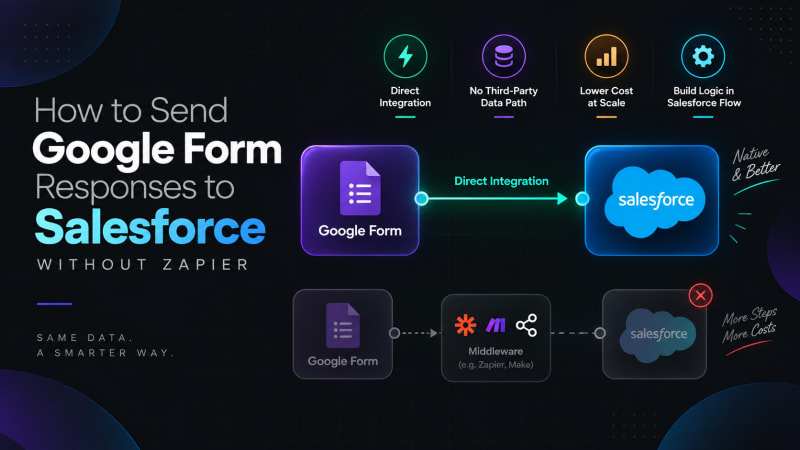
Same data. A smarter way.
Short answer: connect the Google Form directly to your Salesforce org with a free native AppExchange package. The form posts straight into Salesforce, so there is no automation platform in the middle, no per-task billing, and no vendor holding credentials to your org.
If you have searched for this, you have probably already found the Zapier answer. Create a Zap, set Google Forms as the trigger, set Salesforce as the action, map your fields. It works. Plenty of teams run on it happily.
But a lot of people arrive at this search for one of four specific reasons, and it is worth naming them, because they determine which alternative is right for you.
Why do teams want out of the middleware model?
The task pricing stops making sense. Automation platforms bill per task or per operation. A form that gets forty submissions a month is nothing. A form that gets four thousand is a line item, and it grows exactly when your business is going well.
Security review said no. This is the one we hear most from regulated industries and from nonprofits handling beneficiary data. Routing form responses through a third-party automation platform means a vendor holds credentials to your Salesforce org and your form data passes through their infrastructure. Some compliance teams will not sign off on that, and they are not being unreasonable.
Silent failures. A Zap that turns off after repeated errors, a plan limit hit mid-month, an expired connection. The failure mode is that submissions simply stop arriving, and nobody notices until somebody asks where the leads went.
Vendor sprawl. Another login, another dashboard, another renewal, another admin who has to know how it works.
If none of those apply to you, Zapier is genuinely fine and you can stop reading. If one or more does, keep going.
What are the alternatives to Zapier for Google Forms and Salesforce?
Option 1: Web-to-Lead instead of Google Forms
Salesforce ships Web-to-Lead for free. It posts directly into your org with no integration at all.
Use it when: you are capturing sales leads on a public web page and you control the page HTML.
Do not use it when: you need conditional logic, file uploads, multi-page forms, anonymous internal submissions, or anything that is not a Lead. Web-to-Lead only creates Leads, has a daily limit, and offers almost nothing in the way of form design.
Option 2: A Google Sheets connector
Link the form to a Sheet, then use a Sheets-to-Salesforce tool to push rows up.
Use it when: you genuinely need a staging layer, for example to clean or enrich data before it enters the CRM.
Do not use it when: you need real time. This path is almost always scheduled rather than instant, and it adds a second failure point. If somebody sorts the sheet, inserts a column, or opens it in a way that shifts a row, the sync can push wrong data.
Option 3: Build it yourself
A Google Apps Script that posts to a Salesforce REST endpoint. This is what middleware is doing for you, minus the middleware.
Use it when: you have developer capacity and unusual requirements.
Do not use it when: you want somebody else to maintain it. Custom integrations do not fail loudly. They fail eighteen months later when an OAuth flow is deprecated and the author has left.
Option 4: A native AppExchange app
Install a managed package that does exactly this and nothing else.
This is what Google Form Auto Sync is. It packages option 3, the direct Apps Script to Salesforce REST connection, into something an admin can set up in fifteen minutes, with the security, permissions, dashboard and upgrade path already built.
What does the native path actually look like?
The data path is two hops instead of three.
- With middleware: Google Form to automation platform to Salesforce
- Native: Google Form to Salesforce
A short Apps Script inside your own Google Form authenticates using the OAuth 2.0 Client Credentials Flow against an External Client App in your org, and posts the response to a REST endpoint the managed package provides. Salesforce creates a Form_Response__c record, enforcing field-level security on the insert.
Nothing sits in between. There is no account with a third party, no task counter, and no vendor holding your credentials. The full setup guide walks through it step by step.
How does Google Form Auto Sync compare with an automation platform?
| Google Form Auto Sync | Automation platform | |
|---|---|---|
| Cost | Free, no tiers | Per task or per operation |
| Volume limits | None imposed by the app | Plan-dependent |
| Third party in the data path | None | Yes |
| Credentials held by a vendor | No | Yes |
| Setup time | About 15 min for the first form | About 10 min per Zap |
| Where the logic lives | Your org, in Flow | Vendor's builder |
| Connects to hundreds of other apps | No | Yes |
That last row is the honest trade-off and we are not going to pretend otherwise. If your workflow is "Google Form to Salesforce to Slack to a spreadsheet to an email," a general automation platform is doing real work that a single-purpose app does not do. Google Form Auto Sync solves one problem. If you have five problems, you may want both.
What do you give up by dropping middleware?
Two things, and they are worth knowing before you install.
No direct field mapping to Lead or Contact. The app captures the full submission on Form_Response__c rather than writing into standard objects. If you want a Lead created, you build a record-triggered Flow. That is ten minutes of admin work once per form, and the upside is that your raw submission is always preserved and your routing logic is visible in Flow Builder rather than buried in a vendor UI.
One-time setup per form. Connecting a form means pasting a script into that form's Apps Script editor. The wizard generates the script for you, so you are not writing it, but it is a step you repeat for each form rather than a global toggle.
How do you switch from Zapier to a native sync?
If you are already running Zaps, the migration is not disruptive:
- Install Google Form Auto Sync in a sandbox and connect one low-volume form.
- Build the routing Flow that produces whatever record your Zap was producing.
- Run both in parallel for a week on the same form and compare the outputs.
- Move production forms across one at a time.
- Turn off the Zaps once you are confident.
Step 3 is worth doing even if you decide not to switch. Teams that run this comparison sometimes discover their existing sync has been dropping submissions.
Where should you start?
Pick your lowest-risk form, connect it, and submit a test response. Fifteen minutes will tell you more than any amount of comparison reading.
Third-party product features and pricing referenced here reflect publicly available information at the time of writing and change frequently. Check each vendor's current terms before making a decision.
Try it against one form before you migrate anything.
Google Form Auto Sync is free with no tiers and no task counter. Install it, connect a low-volume form, and compare the result against your existing sync.
Get It Now, Free