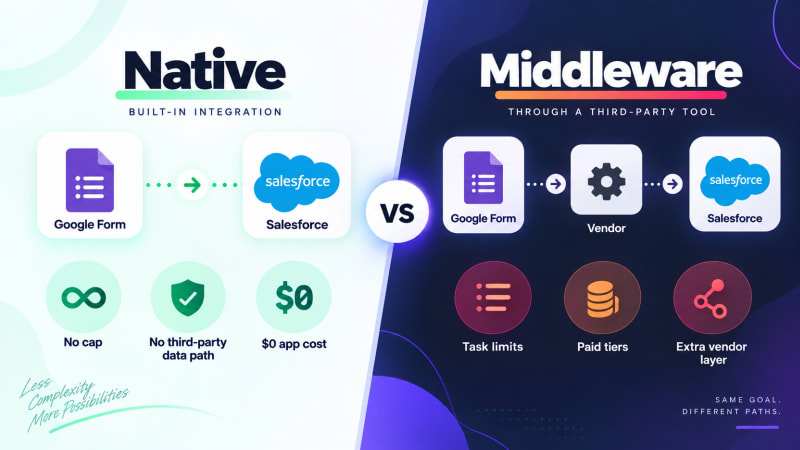
Most free integrations are trials or capped tiers. Here is how to tell them apart.
Short answer: check for a task cap, a paid tier above the free one, and whether the connector itself is free or only the form builder. A genuinely free integration has no meter in its architecture, which usually means no third-party server sits in the data path.
Search for a free way to connect Google Forms to Salesforce and you will get plenty of results. Most of them are not free in the way you mean.
This post is about telling them apart, and about why a genuinely free option can be legitimate rather than a trap.
What are the four kinds of "free"?
Free trial. Fourteen or thirty days, then a card. The integration works beautifully right up until the month you have forgotten you built a business process on it.
Freemium with a task cap. A hundred tasks a month, or a hundred rows, or five hundred operations. Fine for a form nobody uses. The cap bites precisely when the form starts working, which is the worst possible moment for a lead capture process to go quiet.
Free on one side only. The form builder is free; the Salesforce connector is on the business plan. This is extremely common and easy to miss until you are three screens into setup.
Actually free. No card, no cap, no tier above it. Rarer, but it exists.
The reason the distinction matters more here than in most software categories is that an integration is infrastructure. Nobody notices infrastructure until it stops, and a capped integration stops silently. Submissions do not error loudly; they just do not arrive.
How do you check whether an integration is really free?
Before you build a process on any "free" integration, get straight answers to five questions:
- What is the monthly operation limit, and what happens when I hit it? Does it queue, drop, or error?
- Is there a paid tier above this one? If yes, what triggers the upgrade prompt?
- How many records can I sync historically, not just going forward?
- Who holds my Salesforce credentials, and where does my form data physically travel?
- What happens to my data if I stop using the product?
If you cannot find answers on the pricing page in under two minutes, that is itself an answer.
Why is Google Form Auto Sync free?
The obvious question about a genuinely free integration is: what is the catch?
Fair question. Here is ours, stated plainly.
TwinStack Solutions is a Salesforce PDO and consultancy. We build AppExchange products, and we do Nonprofit Cloud implementations and NPSP-to-NPC migrations. Google Form Auto Sync exists because the problem it solves kept coming up in client projects, and because a free, useful, well-built app on the AppExchange is how a consultancy earns the right to be considered for larger work.
That is the model. You install a free app that solves one problem properly. Some fraction of the people who do that eventually need a Salesforce partner for something bigger, and we would like to be on that list. Nobody is harvesting your data, and there is no upsell hiding in the product.
We think stating this outright is better than letting you wonder.
What does free mean specifically for Google Form Auto Sync?
- No license fee. Not now, not on a tier above.
- No per-response charge. A thousand submissions costs exactly what ten do.
- No cap. Nothing counts your submissions, because there is no meter in the architecture to count them with. The form posts directly to your own org.
- No connected-forms limit. Connect one form or forty.
- No feature gating. The dashboard, the response viewer, the permission sets and the setup wizard are all in the free package, because there is only one package.
The reason we can say "no cap" without hedging is structural rather than generous. There is no TwinStack server in the data path. Your Google Form posts to your Salesforce org. We could not meter it if we wanted to.
What does "free" not include?
Being straight about this too.
Support is best-effort. We answer support email and we fix bugs, but there is no SLA attached to a free product. If you need a guaranteed response time, that is a consulting engagement, not an app.
It does one job. It captures Google Form submissions into Salesforce. It does not build forms, does not sync back out, and does not connect to anything else. If you need a general automation platform, buy one.
You still do the routing. Responses land on Form_Response__c. Turning them into Leads or Cases is a Flow you build. Most admins do it in ten minutes; it is still ten minutes.
What does a Google Forms to Salesforce integration cost over a year?
Take a modest scenario: three Google Forms across your organization producing about five hundred submissions a month between them.
| Approach | Year one cost |
|---|---|
| Manual CSV import | "Free," plus roughly 2 hours of admin time a week |
| Automation platform, mid tier | Typically a few hundred to a few thousand USD, depending on vendor and plan |
| Custom-built integration | Developer build cost, plus indefinite maintenance |
| Google Form Auto Sync | $0, plus about 30 minutes of one-time setup per form |
The manual row is the one people underestimate. Two hours a week is roughly a hundred hours a year of somebody's time spent moving data that a machine should be moving.
How can you try it on a form you already have?
The fastest way to evaluate any of this is to connect one real form and submit a test response. Install it in a sandbox if you would rather not touch production. The setup wizard is the same either way, and the step-by-step setup guide covers the whole process.
Third-party pricing referenced here reflects publicly available information at the time of writing and changes frequently. Check each vendor's current terms before deciding.
Test the claim against a form you already have.
No card, no cap, no tier above it. Install Google Form Auto Sync in a sandbox or production and connect one real form.
Get It Now, Free