How a volunteer coordinator stopped rebuilding her list by hand, and what the duplicate records were really costing.
Illustrative example. Riverside Community Trust is a composite organization built from patterns we see repeatedly in nonprofit Salesforce work. It is not a named customer, and the figures shown are representative of the category rather than measured at one client.
At a glance
| Organization | Riverside Community Trust, community services nonprofit |
|---|---|
| Salesforce | NPSP, 14 users |
| Volume | About 120 volunteer signups per month, spiking to 400 during campaigns |
| Problem | Manual reconciliation of Google Form signups into NPSP |
| Solution | Google Form Auto Sync plus a record-triggered Flow |
| Implementation | One afternoon, one admin |
| Annual time recovered | About 78 hours |
| Recurring cost | $0 |
Executive summary
Riverside spent roughly 90 minutes each Friday transcribing volunteer signups from a Google Sheet into NPSP. The visible cost was coordinator time. The larger and less visible cost was a duplicate rate of approximately 7%, which fragmented volunteer service history and blocked a planned recognition program. Automating capture removed the transcription work entirely and reduced duplicate creation to near zero. The recognition program launched the following quarter.
What did the manual process actually cost?
Before recommending any change, the admin measured four weeks of the existing process. This is the step most organizations skip, and it is what makes the rest of the analysis possible.
| Measure | Baseline (4-week average) |
|---|---|
| Signups received per week | About 30 |
| Coordinator time per week on transcription | 90 minutes |
| Time from signup to record in NPSP | 2 to 5 days |
| Signups not entered before the shift | About 4 per month |
| New Contacts that duplicated an existing volunteer | About 8 per month |
| Estimated duplicate rate | About 7% of signups |
Two figures are worth separating. Ninety minutes a week is 78 hours a year, which is the number that gets a project approved. The 7% duplicate rate is the number that actually mattered.
The compounding cost of duplicates
Each duplicate splits one volunteer's service history into two partial records. Over roughly two years of operation, Riverside had accumulated an estimated 200 duplicate Contacts.
The consequence was not cosmetic. Riverside could not answer a question that should have been trivial: who are our most committed volunteers? The data existed but was fragmented across records, so any report on cumulative hours or shift count understated participation for exactly the volunteers who participated most.
A planned volunteer recognition program was postponed twice for this reason. A recognition program that thanks the wrong people is worse than none at all.
Why did the standard fixes not fit?
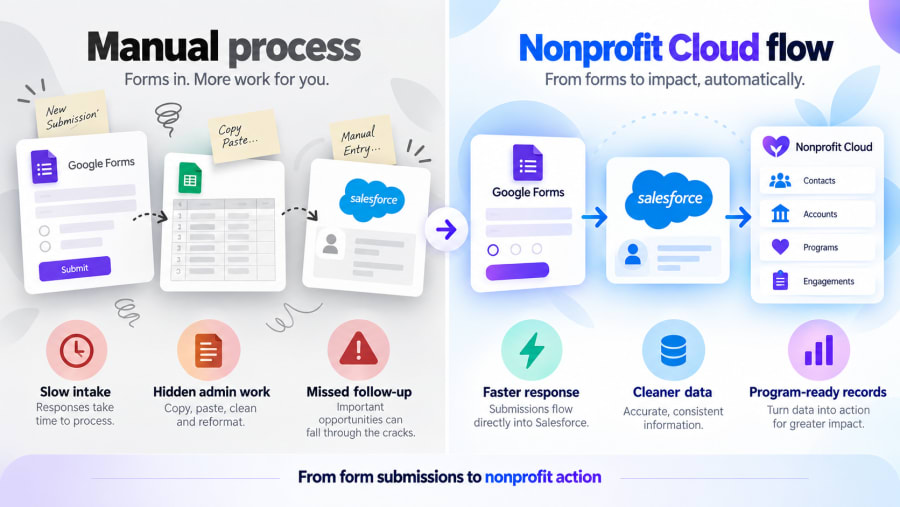
The team evaluated three options before landing on a native app.
Automation platform
Quoted at approximately $1,200 per year at their volume. Two objections killed it.
- Budget framing. Recurring software spend in a nonprofit is defended against program delivery. "Software to move data between two systems we already pay for" is a difficult sentence to say to a board.
- Data governance. Volunteer forms collect emergency contacts and accessibility needs. The operations director asked who else would process that data. The honest answer, a commercial automation vendor, triggered a vendor assessment, a processing agreement and a privacy notice change. The compliance effort outweighed the convenience.
Custom integration
Rejected on maintenance risk. Riverside has no developer, and the volunteer coordinator role had turned over twice in three years. Anything only one person understood would fail at the next handover.
Doing nothing
The status quo. Worth naming as an option because it was the incumbent and, without the baseline measurement above, would probably have won by default.
How was it implemented?
Total elapsed time: one afternoon, one admin, no developer.
- Form inventory. One hour spent listing every active Google Form in the organization. Eleven were found; seven were still in use; two had been collecting responses nobody had reviewed in months. This hour reshaped the rollout order.
- Package install into sandbox. Google Form Auto Sync created its object, two permission sets and a setup tab.
- Form connection. The five-step wizard generated the endpoint and credentials. The admin created an External Client App, set a dedicated Run-As user under the Policies tab, and pasted the generated script into the volunteer form's Apps Script editor. About 15 minutes.
- Test submission. Appeared in Salesforce in approximately four seconds.
- Routing Flow. The substantive work, and the part that required actual design thinking.
The routing logic
A record-triggered Flow on Form_Response__c, filtered to the volunteer form by form name:
- Get Records on Contact, filtered by the submitted email address
- Decision: match found, use the existing Contact; no match, create a Contact
- Create the Volunteer Shift against the correct date
- Write the created record ID back onto the Form Response for traceability
- Fault path: mark the response as Failed with the error message
The fault path is the element Riverside would tell other nonprofits not to omit. Under the manual process a failed entry produced no artifact at all. Now a failure leaves a queryable record with the original submission intact, available to correct and reprocess.
What were the results?
Measured over the three months following go-live, against the four-week baseline.
| Measure | Before | After | Change |
|---|---|---|---|
| Coordinator time per week | 90 min | Under 10 min | -89% |
| Annual coordinator hours | About 78 | About 8 | -70 hrs |
| Signup to record in NPSP | 2 to 5 days | Seconds | Over -99% |
| Duplicate Contacts per month | About 8 | Under 1 | -88% |
| Signups missed before a shift | About 4 per month | 0 | -100% |
| Recurring software cost | $1,200 quoted | $0 | -$1,200 |
The result that was not on the table
The volunteer recognition program launched the following quarter. For the first time the cumulative service history in NPSP was complete enough to trust, because new signups stopped fragmenting it and the existing duplicates could be merged against a stable baseline.
That outcome is difficult to quantify and is the one the coordinator cites first.
"After two years of Fridays, watching the first test submission land in about four seconds looked faintly ridiculous."
Volunteer Coordinator, Riverside Community Trust
Why did this work?
The baseline measurement did the persuading. Four weeks of data converted an annoyance into a 78-hour figure and a 7% error rate. Neither was arguable.
Capture and routing were separated. Because submissions land on a neutral object before any Flow runs, a routing error never destroys data. During the first three weeks two Flow bugs were found and fixed, and in both cases the affected submissions were reprocessed from the preserved raw records.
One form was perfected before scaling. The volunteer form ran alone for three weeks. Both bugs above surfaced in that window, where diagnosing them meant examining one Flow rather than five.
The logic lives where the next admin will look. Matching rules sit in Flow Builder. In a sector with high turnover, that is a durability property, not a convenience.
What would we do differently?
Two things, offered because a case study where everything went smoothly is not useful to anyone planning the same project.
Deduplicate the existing backlog first. Riverside automated capture, then cleaned the 200 historical duplicates. Doing it in the reverse order would have been easier, because merges would not have been competing with new inbound records.
Add form-side validation earlier. Both Flow failures traced to malformed email addresses. Enabling response validation on the email question in Google Forms, a two-minute change, would have prevented both.
The same capture-then-route pattern is covered step by step in our guide to routing form responses with Flow, and the nonprofit context in more depth in Google Forms to Salesforce for nonprofits.
Google Form Auto Sync is free on the Salesforce AppExchange.
Install it, connect one form, and watch a test submission land in your own org. No middleware, no task counter, no tiers.
Get It Free