Short answer: Salesforce Voice (formerly Service Cloud Voice) puts Amazon Connect telephony inside the Salesforce Service Console. Agents answer, transcribe, record and log calls in one screen, and every call becomes a Salesforce record that automation, AI and reports can use.
Digital channels have grown fast, but voice is still the highest-stakes touchpoint for complex customer questions. Older set-ups split telephony and CRM into separate systems, which created bottlenecks and kept native AI away from live calls.
Salesforce Voice with Amazon Connect replaces that model. Built on AWS infrastructure, it brings live audio, real-time transcription, CRM automation and Salesforce AI into a single screen.
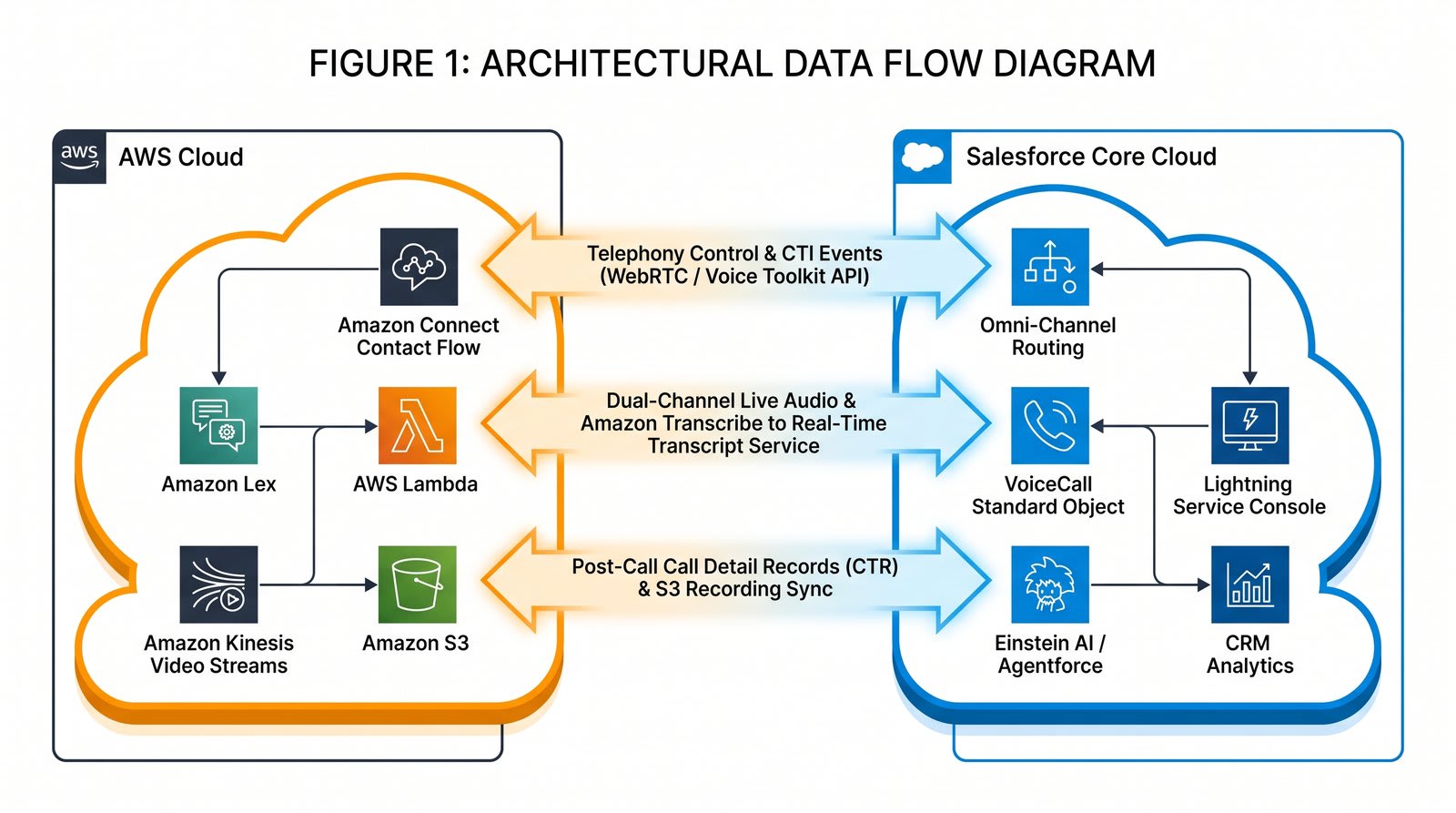
How the data flows between Amazon Connect and Salesforce
The integration runs in both directions. Amazon Connect handles the call itself, while Salesforce handles routing, records and the agent's workspace.
Core Salesforce Voice features
Dynamic phone menus with personalisation
Traditional phone menus follow rigid, static trees. Salesforce Voice can build menus that respond to who is calling.
- Caller identification: finds the matching customer record from the phone number.
- Context-driven options: if the caller has an open high-priority case, the menu can offer an update on it.
- Self-service: natural language bots can answer common questions without an agent.
- Unified routing: calls follow the same routing logic and queue rules as chat, messaging and email.
Customer 360 view during the call
When a call reaches an agent, the customer's record opens on screen, so nobody has to search for it.
- Instant screen pop: the moment the agent accepts, Salesforce opens the matched customer record.
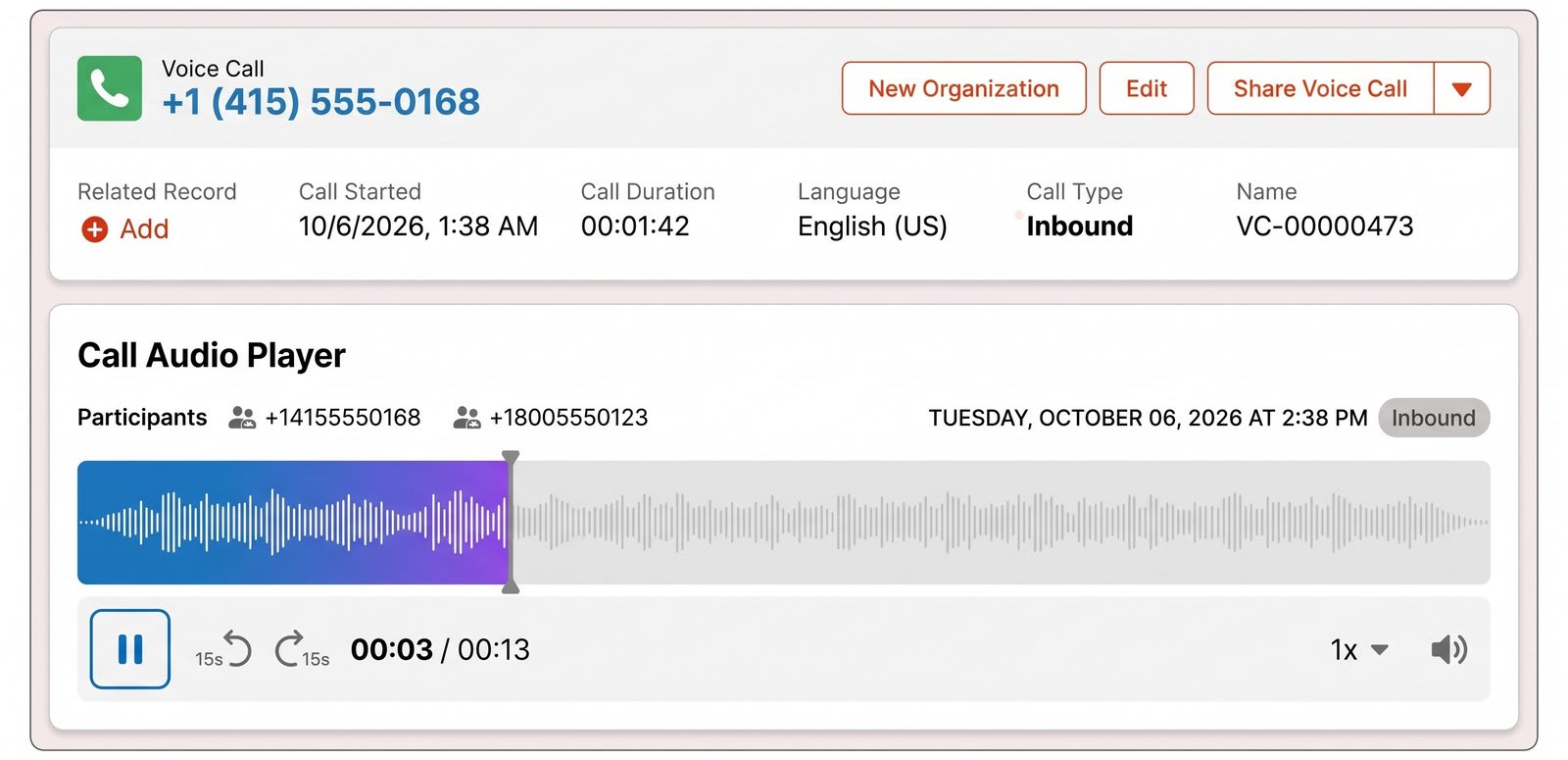
- VoiceCall record: every call creates a dedicated record with the call details, such as duration, and a link to the recording.
- One console: during the call, the agent sees the customer's history, past cases and recent activity in one place.
Real-time transcription and sentiment analysis
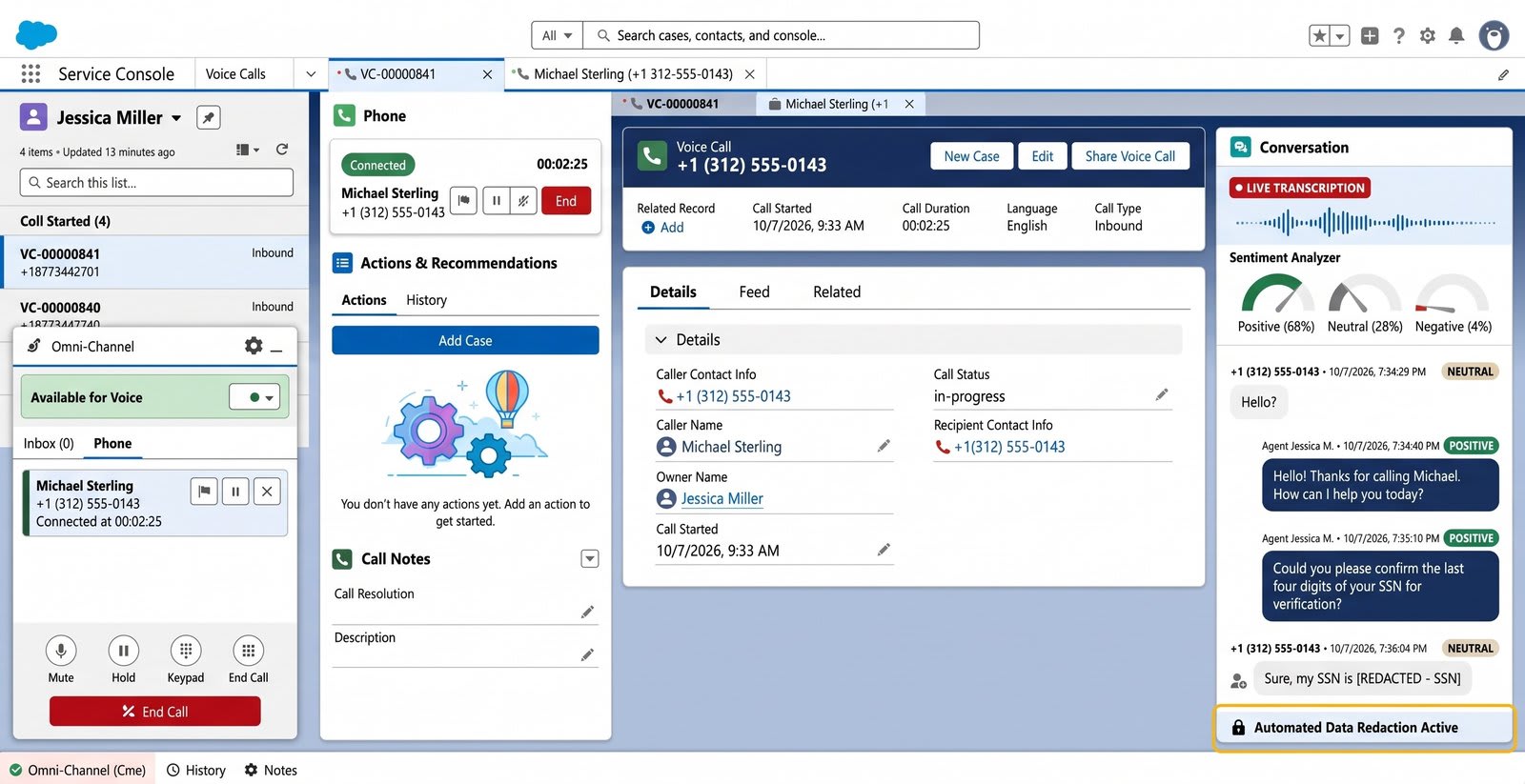
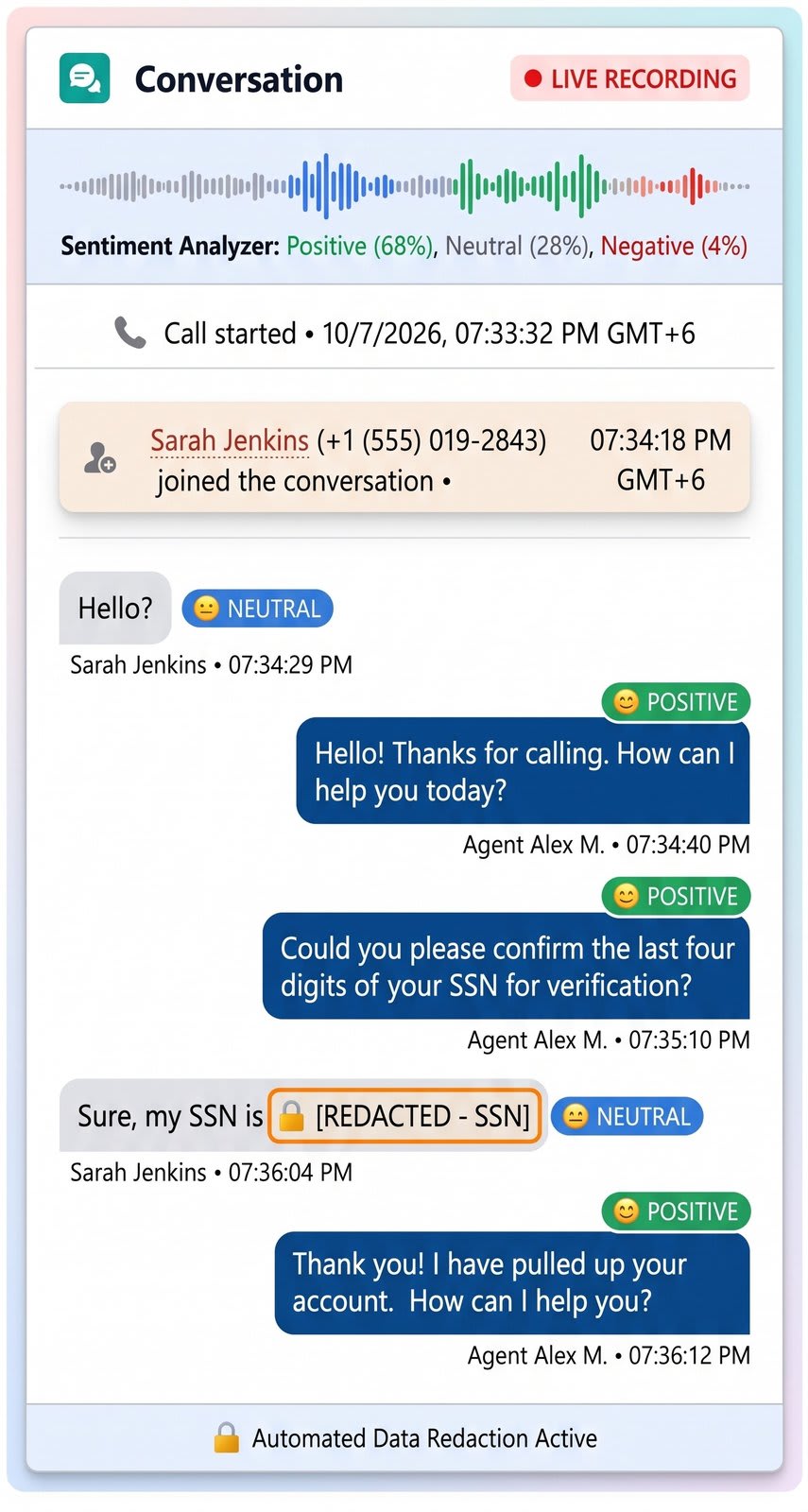
- Live transcript: words appear in the console as they are spoken, so agents do not need to take notes by hand.
- Sentiment analysis: the conversation is analysed as it happens, showing shifts between positive, neutral and negative.
- Automatic redaction: sensitive details such as card numbers and national ID numbers can be removed from transcripts.
Call recording and compliance
- Built-in audio player: recordings play next to the transcript, with variable speed and a visual waveform.
- Pause and resume: agents can pause recording while collecting sensitive data, and recording can pause automatically during payments.
Voicemail management
- Inbound voicemail: voicemails are transcribed and routed to the right agent or queue, with the audio and full transcript on the record.
- Voicemail drop: agents can leave a pre-recorded message on a customer's answering machine with one click.
Post-call surveys
- Straight after the call: the caller moves to a short survey as soon as the agent hangs up.
- Closed-loop feedback: scores land on the customer record, and a low score can create a follow-up task for a supervisor.
Agentforce and Einstein AI
- Voice agents: Agentforce can hold conversations, take actions and hand over to a human agent with the full context.
- Next best action: keywords in the conversation can trigger recommendations, such as an approved offer or a retention script.
- Call summaries: generative AI can write a standard summary at the end of the call (reason, key points, resolution, next steps), which cuts wrap-up time.
CRM automation and wrap-up controls
- Automatic records: Flows can create cases and log activities without manual data entry.
- Presence sync: the agent's phone status stays in step with Omni-Channel, so other work such as chats pauses during a call.
- Wrap-up timers: admins set how long agents get for after-call work before the next call arrives.
Reporting, dashboards and supervisor tools
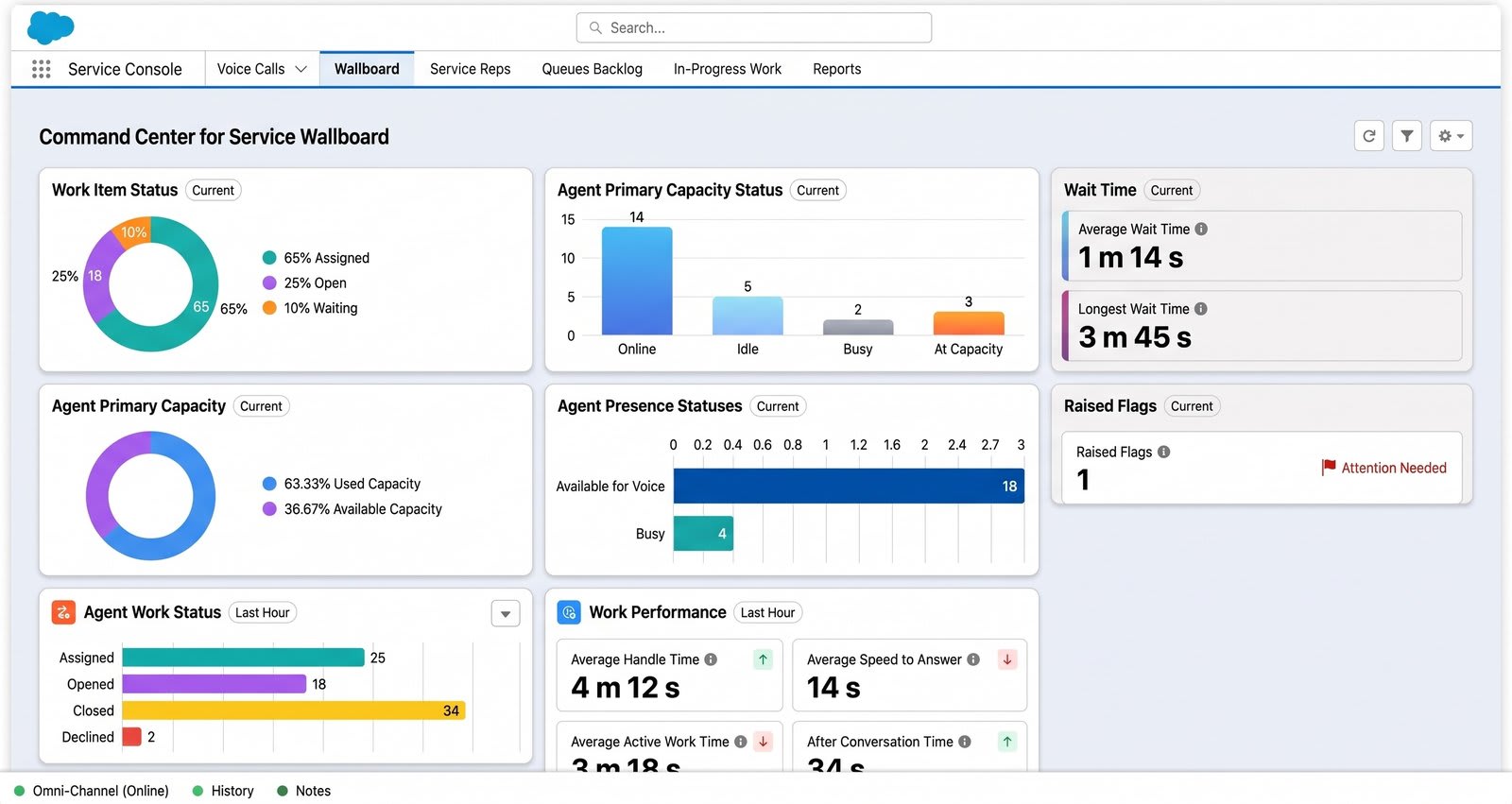
- Real-time view: supervisors see active agents, queue loads, live call times and sentiment across calls.
- Monitor, whisper and barge: supervisors can listen in, speak only to the agent, or join the call.
- Historical reporting: voice metrics sit next to standard Salesforce data, so dashboards can show average handle time, first contact resolution and other contact centre KPIs.
Feature availability depends on your Salesforce Voice edition, your telephony model and your licences. Check the current Salesforce release notes before you plan around a feature.
Frequently asked questions
What is Salesforce Voice?
Salesforce Voice, formerly Service Cloud Voice, is Salesforce's contact centre telephony. It brings calls, transcripts and recordings into the Service Console, using Amazon Connect or a partner telephony provider.
Does Salesforce Voice transcribe calls in real time?
Yes. With Amazon Connect, the transcript appears in the console as people speak, and sensitive details can be redacted.
Is every call saved in Salesforce?
Each call creates a VoiceCall record with call details and links to the recording and transcript, so automation and reports can use it.
Can Agentforce work with Salesforce Voice?
Yes. Agentforce can handle voice conversations and hand over to a human agent with context, and generative AI can summarise calls.
Planning a Salesforce Voice roll-out? Talk to us about what fits your team.